THE FIELD NOTES / GROK
Grok Imagine Image Prompts: 3 Portrait Templates and Lighting Examples
Copy three Grok image prompt templates, compare window-light references, and troubleshoot plastic skin, missing backgrounds and unnatural color.
The short answer
A useful image prompt tells the viewer what to notice first. Describe the subject, framing, light direction and background before adding mood words or decorative style labels.
Read the reference before writing the prompt
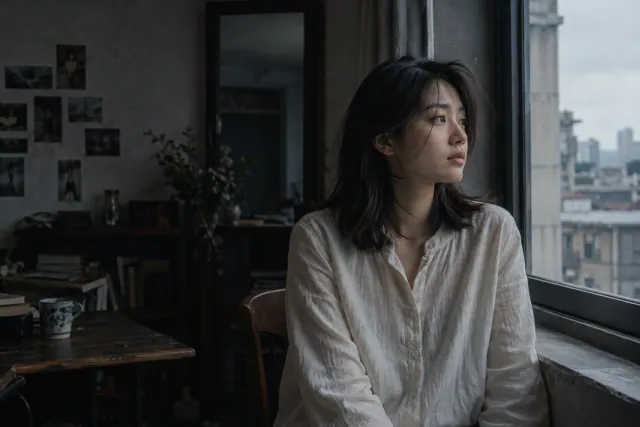
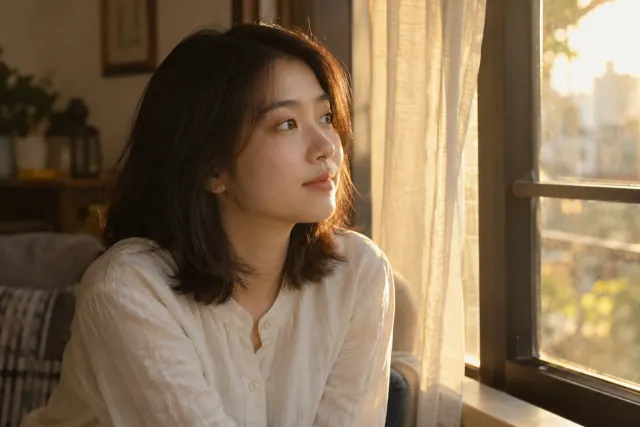
Existing WINDOWLIGHT style-library images, not verified outputs from the model discussed here. These are visual planning examples, not before-and-after tests.
Choose one template
Choose one crop before generating: a wide environmental portrait or a closer head-and-shoulders view. Use the same subject description and available model settings for comparisons. These examples describe lighting; they do not establish which model made the reference images.
Environmental portrait
Use when the room should help tell the story.
Wide environmental portrait of an adult with dark shoulder-length hair and a plain ivory linen shirt, seated beside a window on the right side of the image. Place the person right of center and leave the dim room visible on the left. Soft overcast window light, readable eyes, neutral skin, cool gray surroundings. Natural fabric folds and restrained skin texture.
Review: Can you see the room, the window and a clear light-to-shadow transition on the face?
Warm window portrait
Use when hair highlights and a warmer atmosphere matter more than room detail.
Head-and-shoulders portrait of an adult with dark shoulder-length hair in an ivory linen shirt, looking toward a window on the right side of the image. Low warm sunlight catches the edges of the hair. Gentle reflected light keeps the face readable. Quiet room, natural skin color, restrained highlights, no studio spotlight.
Review: Look for bright hair edges without an entirely orange face or a blown-out cheek.
Natural skin revision
Use as an editing brief with the approved portrait attached, if your selected mode supports image editing.
Keep the attached portrait composition, subject, clothing and light direction. Reduce the glossy, beauty-retouched finish of the skin. Preserve subtle tonal variation and natural texture without adding gritty pores or sharpening halos. Leave the room and hair unchanged.
Review: Compare the face at normal viewing size. Added texture alone is not evidence of improvement.
If the result misses the brief
| Problem | Next experiment | What to inspect |
|---|---|---|
| Face looks plastic | Remove conflicting retouching language and reduce glossy skin highlights. | Inspect the cheek and forehead at the intended display size. |
| Room disappears | Use environmental framing and name the space that must remain visible. | The window and background should survive the crop. |
| Everything turns orange or blue | Describe skin color separately from room color and light warmth. | Skin should retain distinct tones rather than one uniform tint. |
Keep the source and other settings stable when testing one revision. These are suggested experiments, not measured fixes or success-rate claims.
Make the composition unambiguous
Specify a close-up, waist-up portrait or environmental view. Explain where the subject sits in the frame and whether you need empty space for text. A good advertising crop and a good profile picture are different tasks even when the subject is the same.
If you need several formats, decide which one is the master composition. Keep essential details away from its edges so alternate crops can work. Avoid requesting tiny background details that will be invisible at the final display size.
Describe where the light comes from
“Cinematic” describes an intention but leaves the lighting arrangement open. A more useful instruction names the source: a broad window to camera left, soft shadows on the far cheek, a subdued background. Choose one arrangement and keep it stable for the first comparison.
Separate lighting from color grading. First make the face readable. Then test a warmer palette, less saturation or deeper shadows. If you change all three at once, an improved image will not tell you which decision helped.
Use a simple comparison sheet
Save each prompt next to its result. Compare framing, face readability, material texture and distracting artifacts using the same criteria. Do not judge only by the most striking thumbnail; inspect the output at the size you will actually use.
Once a direction works, shorten the prompt by removing phrases that did not affect your decision. This creates a reusable brief for the next subject rather than a growing list of adjectives that you cannot evaluate.
An editable starting brief
This is an original planning exercise, not a tested output guarantee. Adapt it to your subject and the controls available in your selected interface.
Waist-up editorial portrait of an adult ceramic artist in a plain linen shirt. The subject sits on the right side of the frame with clear negative space on the left. A broad window at camera left produces soft facial shadows. Muted earth colors, visible fabric texture, quiet workshop background, natural expression.
Before you approve the result
- The crop fits the intended placement.
- The dominant light direction is easy to identify.
- Texture adds detail without obscuring the subject.
Do more adjectives make a better image?
Only when they resolve a visual decision. Replace vague clusters such as “epic, stunning, amazing” with observable instructions about framing, light or material.
Official capability references
Editorial reviewed October 28, 2026. Feature availability varies by model, version and interface. These references do not imply affiliation with the model providers.