THE FIELD NOTES / KLING
Kling Image-to-Video: 3 Prompt Templates and First-Frame Fixes
Prepare a Kling starting image, copy portrait or cup-action prompts, and check compatible start/end frames with a visual reference and troubleshooting table.
The short answer
Choose a first frame that already supports the action. Then describe the motion and its ending without asking the system to redesign the subject or scene.
Read the reference before writing the prompt
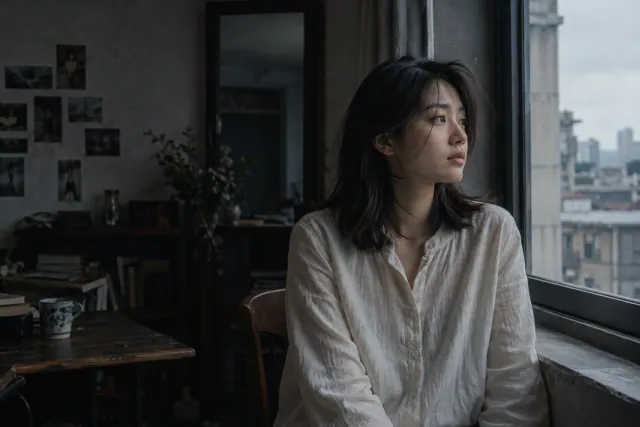
Existing WINDOWLIGHT style-library images, not verified outputs from the model discussed here. These are visual planning examples, not before-and-after tests.
Choose one template
Confirm that image-to-video is selected and your source is attached. For start/end-frame work, use the corresponding mode only if available in your interface. Plan one action before choosing duration, and record the actual settings rather than assuming every Kling version exposes the same controls.
Single-frame portrait
Start with a visible face and keep the existing pose.
Use the attached image as the starting composition. The seated person makes a slight glance toward the window and then remains still. Keep the camera fixed and preserve the hairstyle, shirt and room. Maintain the existing window light. One continuous shot with no cut.
Review: Inspect the face during the glance and the window frame throughout the shot.
Visible hand and cup
Use a different source showing the hand, cup and clear destination on the table.
Animate the supplied image in one continuous shot. The already visible hand gently places the cup on the clear area of the table, releases it and moves away. Fixed camera. Preserve the cup shape and existing window light. End with the cup stationary and fully visible.
Review: Check contact, release and the cup resting on the table; good endpoints alone are insufficient.
Compatible start and end
Only for a supported start/end-frame mode with two approved, compatible images attached.
Connect the supplied starting and ending frames as one continuous movement. Keep the same person, clothing, room and light direction. The person makes only the small head movement needed to reach the ending pose. Fixed camera, no intermediate cut, no change of wardrobe or location.
Review: Inspect the middle for face changes or a sudden dissolve. Matching endpoints do not prove a clean transition.
If the result misses the brief
| Problem | Next experiment | What to inspect |
|---|---|---|
| A new hand or object appears | Use a source where the necessary hand and object already exist, or simplify the action. | Check the starting input before evaluating motion. |
| The middle of the transition breaks | Reduce differences between the start and end poses; keep crop and lighting compatible. | Review the largest change frame by frame. |
| Subject moves out of frame | Leave space in the direction of movement and shorten the requested action. | The important detail must remain visible until the ending. |
Keep the source and other settings stable when testing one revision. These are suggested experiments, not measured fixes or success-rate claims.
Use the frame as a staging decision
A source image establishes where objects begin and what is visible. Inspect the space around hands, faces and moving props. If an object is already cut off, moving it farther toward that edge may make the missing information more noticeable.
Kling VIDEO 3.0 documents image-to-video and start/end-frame modes. Check which mode your interface offers before preparing a second frame. A pair of attractive images is not automatically a plausible motion sequence.
Choose a physically readable action
Start with an action that can happen from the existing pose: a small glance, a slow turn of a visible object or a gentle environmental movement. Do not ask a seated close-up to become a wide running shot in the first exercise.
Give moving objects a destination. “The hand places the cup on the clear area of the table” is easier to evaluate than “the person interacts with the cup.” Keep the camera stable while testing a difficult subject action.
Inspect the transition as well as the endpoints
The first and last frames can both look convincing while the middle contains shape changes or abrupt motion. Watch the whole clip and inspect the moments when objects touch, turn or pass behind one another.
If a second frame is supported, make sure the requested action can reasonably connect it to the first. Reduce differences in pose, scale and lighting before trying a large transition. Save the input pair with the output so revisions remain traceable.
An editable starting brief
This is an original planning exercise, not a tested output guarantee. Adapt it to your subject and the controls available in your selected interface.
Animate the supplied image as one continuous shot. The visible hand gently places the cup on the empty part of the table and moves away. Keep the camera fixed, preserve the cup shape and maintain the existing window light. End with the cup stationary and fully visible.
Before you approve the result
- The input crop leaves room for the action.
- Object contacts remain readable in the middle of the clip.
- The last frame provides a usable edit point.
Can I use any two images as start and end frames?
Check both mode support and visual compatibility. Large changes in subject identity, scale or location require a more difficult transition and may not suit a single continuous shot.
Official capability references
Editorial reviewed October 28, 2026. Feature availability varies by model, version and interface. These references do not imply affiliation with the model providers.